01 First things first

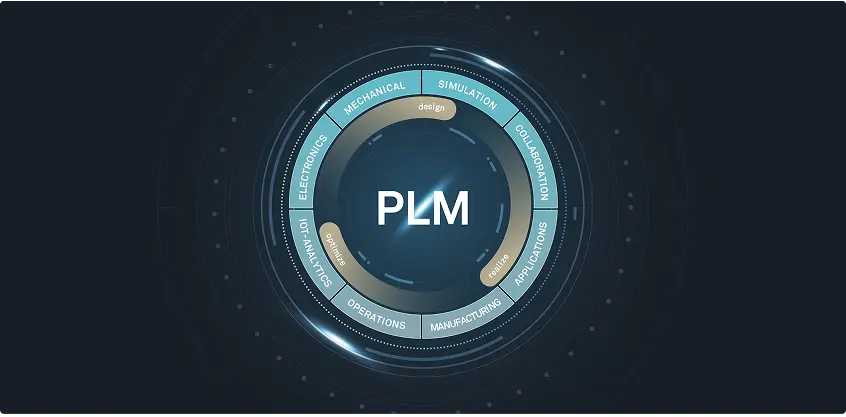
Product Lifecycle Management (PLM)

Product Lifecycle Management (PLM) is a strategic approach to developing, managing, and improving products from conception to disposal—a way of dealing with the different stages across a product lifecycle. However, it can also be a piece of software (or system) that helps manufacturing organizations and Engineering-to-Order (ETO) companies efficiently work through these different stages.

By blending existing procedures and processes with individual expertise and innovative technology, PLM software like Siemens Teamcenter provides a framework that enhances product quality, reduces costs, and accelerates time to market. Product Lifecycle Management software offers a single platform for all product data and related processes. This single source of truth makes it easier for stakeholders to find the most up-to-date information, allowing them to make the right decisions more quickly and efficiently.
02 The stages of PLM

What, when, and why?

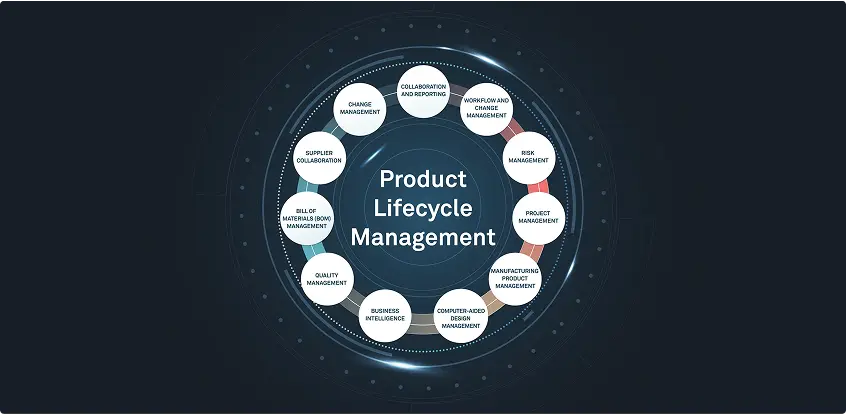
From a manufacturing and ETO perspective, Product Lifecycle Management can be divided into five main stages: Conception, Design and Engineering, Manufacturing, Commissioning, and Decommissioning.
{{second-first}}

{{second-second}}

{{second-third}}

{{second-fourth}}

{{second-fifth}}

03 The benefits of PLM

How can PLM help?

The benefits of Product Lifecycle Management for manufacturing aren’t just linked to transparency and timekeeping. Clear protocols facilitated by comprehensive PLM software like Siemens Teamcenter increase the likelihood of creating better-quality products, fewer errors, and greater cost savings thanks to more efficient production processes.

In short, PLM software is crucial for both custom ETO requests and mass-produced products.

{{third-first}}

{{third-second}}

{{third-third}}

{{third-fourth}}

{{third-fifth}}

04 The key components of PLM software

Optimizing the PLM value chain

PLM software streamlines the way different manufacturing companies and specific stakeholders can access data. This is done by integrating tools and features to optimize the overall management of a product. Some tools, such as CAD software, are used heavily at specific stages, whereas key components like document management make up the backbone of a PLM system’s overall offering.

Siemens Teamcenter offers a multitude of tools and components that make PLM a no-brainer for manufacturers looking to scale and optimize their business processes without losing track of the original vision for the brand and products.

{{fourth-first}}

{{fourth-second}}

{{fourth-third}}

{{fourth-fourth}}

{{fourth-fifth}}

{{fourth-sixth}}

{{fourth-eighth}}

{{fourth-seventh}}

05 Picking a PLM implementation partner

Ask yourself the right questions

Picking a PLM partner is the first step to increased efficiency, smoother processes, and better data management. However, to ensure your business's needs are met now and in the future, it's worth considering a few things.

{{fifth-first}}

{{fifth-second}}

{{fifth-third}}

{{fifth-fourth}}

{{fifth-fifth}}

{{fifth-sixth}}

06 Digital transformation with CLEVR

Product Lifecycle Management in action

Siemens Teamcenter is a comprehensive PLM software suite offering extensive capabilities for managing product data and processes across the entire product lifecycle.

We chose to partner with Siemens because of Teamcenter’s collection of tools and integrations, as well as its overall usability.

Nel Hydrogen recently partnered with CLEVR to significantly enhance its product development capabilities. By leveraging Siemens Teamcenter, CLEVR is implementing a comprehensive PLM solution that streamlines data management and helps automate engineering processes. The collaboration is ongoing, with a view to expanding the scope of this initial project.

Our expertise in digital transformation and PLM is what sets us apart from other solution partners. We combine extensive industry knowledge with digitalization expertise to implement tailor-made Siemens Teamcenter solutions that automate and streamline product lifecycle processes.

Even as your company scales and adapts to new challenges, your processes remain flexible and robust. Let CLEVR guide you through today’s bold decisions for greater peace of mind.

Design and Engineering

This stage includes hands-on tasks that bring a concept to life; detailed product designs, specifications, and prototypes are the name of the game. Tools like CAD systems help designers visualize ideas, enabling engineers to create prototypes.

Quality Assurance and Engineering departments in larger manufacturing organizations use prototypes to ensure a product meets design and performance requirements before mass production. Feedback from testing highlights the refinements needed for validation.

ETO companies often use virtual prototypes, models, and simulations during this stage. Avoiding too many physical iterations helps keep costs low for businesses that can't benefit as much from economies of scale.

Conception

During the ideation phase, competitive analyses help identify market gaps and customers’ unserved needs. This information is used to conceptualize the product, creating a solid foundation for the subsequent PLM stages and decision-making processes.

Automotive manufacturers may, for instance, conduct a competitive analysis to identify gaps in the market for electric trucks, conceptualizing a new model that meets specific urban delivery service needs.

Manufacturing

From a mass manufacturing perspective, this stage starts with a validated, market-ready product resulting from iterative feedback rounds during development. Once the production process is established, it’s time to scale. Planning, executing, and monitoring the scaled production process involves supply chain management and quality control.

ETO companies usually have a single manufacturing process and only one chance to get an order right. Therefore, this stage depends heavily on accurate information from the Design and Engineering, facilitated by efficient PLM software that gets the right information to the right people at the right time.

Commissioning

For mass manufacturers, this stage consists mainly of introducing the product to the market, distribution, sales, and support. Successful product launches require these aspects to be aligned from the start.

In an ETO context, commissioning involves customizing a product's delivery, installation, and support. Successfully deploying bespoke products requires careful logistics coordination, detailed installation procedures, and tailored customer support.

Managing product effectivity—acquiring spare parts and documentation for a specific product version—is also crucial here.

PLM software helps manage these complex processes by providing precise, up-to-date information to all stakeholders. For example, in an ETO machinery project, PLM ensures that engineering details, installation guides, and support documentation are all aligned, allowing for a smooth transition from production to customer site setup and ongoing support.

Decommissioning

Product decommissioning involves Product Managers, Environmental Compliance personnel, and logistics teams. Retirement isn’t just stopping production—effective communication with customers and suppliers is crucial. A tech company may need to plan for disposing of, recycling, or remanufacturing obsolete laptops, ensuring the remaining stock is sold off or used for spare parts. Letting the right people know exactly how these processes should be expected to work is almost as important as the procedures themselves.

For ETO companies, decommissioning involves carefully planning the phase-out of custom products and ensuring clients are supported throughout the process.

Enhanced product quality

PLM software creates a single source of truth for all product data, giving (authorized) departments and stakeholders access to the latest information. This comprehensive data management reduces errors resulting from miscommunication or outdated information.

PLM software also supports extensive testing and validation processes, which helps manufacturers identify issues early in the development cycle.

Reduced time to market

PLM software streamlines a product’s development stage by automating workflows and improving communication among teams. Reducing the time spent on administration speeds up decision-making and helps avoid human errors often caused by repetitive, manual tasks.

Enhanced data management and collaboration also improve the efficiency of the earlier lifecycle stages, which leads to quicker market introductions.

Better data management and collaboration

A centralized PLM system ensures that all product data is easily accessible to those who need it, such as marketers creating assets or campaign messages and after-sales personnel creating training assets for customer support staff. This improves data accuracy and consistency, enabling more informed decision-making. PLM software allows and encourages departments to share information in real time, which reduces information silos and keeps everyone on the same page with the most up-to-date information. 

Cost savings across the product lifecycle

PLM software helps companies avoid inefficient practices that often clog up business processes. This helps reduce costs associated with product development, manufacturing, and maintenance. It also supports better resource management and reduces the need for costly reworks.  

An overview of the production process, including governance and control of automated machinery, lets companies spot material waste and identify ways to optimize production schedules. This reduces manufacturing costs linked to energy consumption and raw materials, which minimizes the environmental impact of a company’s operations. Siemens Teamcenter offers a Carbon Footprint Calculator to help companies assess their decisions as they look to strike a balance between environmental impact, cost reduction, and meeting customer demands. 

Integration and connectivity

Siemens Teamcenter offers extensive integration capabilities with real-time data access for better collaboration. This ensures that all departments and stakeholders across the product lifecycle are on the same page. This is crucial for ETO manufacturers and larger organizations aiming to streamline operations, maintain product quality, and scale effectively.

Good PLM software should seamlessly integrate with various enterprise systems and authoring tools, ensuring cohesive product data management throughout its lifecycle. This means creating a seamless flow of information by connecting Enterprise Resource Planning (ERP) systems, Computer-Aided Design (CAD) tools, and document management software.

Computer-aided design (CAD)

CAD software is essential for creating precise 2D and 3D models, allowing engineers and designers to visualize and iterate on product designs. In PLM, CAD integrates design data with other lifecycle processes, ensuring that all design changes are tracked and managed efficiently. As you’d imagine, CAD software is heavily involved in the conception stage of a product’s lifecycle. So is Product Data Management. 

Product Data Management (PDM)

PDM centralizes all product-related data—which often changes—ensuring accessibility, accuracy, and security. This invariably improves collaboration and decision-making. Within PLM, PDM manages the lifecycle of product data, including version control and access permissions, ensuring that the latest information is available to the right people. 

Bill of Materials (BOM)

A bill of materials (BOM) lists all materials, parts, and assembly configurations required to manufacture a product, which makes it a key feature of the development stage. A BOM represents the product structure in a hierarchical format that clearly presents the relationship between certain components and assemblies. Depending on the product and industry, a BOM can range from a simple, single-level structure to a multi-level structure with specific manufacturing, engineering, and customization guidance.

Like PDM systems, BOM systems track changes. This means that any requested changes to a BOM are documented and sent for approval. A BOM can also include tools to analyze the cost of materials and components. Having an exhaustive and holistic view of the costs will help manufacturers with budgeting forecasts, general cost management, and reporting.

Engineering change management

Engineering Change Management is the tracking, controlling, and approving of changes to product designs and processes. During the development stage, Engineering Change Management helps stakeholders assess the impact of proposed changes on existing designs and processes. It also records modifications, which is vital with the rapid development of a product often containing so many iterations—some of which may need to be revisited for another assessment. 

Computer-Aided Manufacturing (CAM)

CAM software automates manufacturing by converting CAD models into machine instructions, enhancing production precision and efficiency. In PLM software, CAM ensures that manufacturing data is consistent with design data, reducing errors and streamlining the transitions between the design, development, and production stages. 

Supply Chain Management (SCM)

SCM tools are used in the launch and production phase to manage the flow of goods, information, and finances related to a product. In PLM, SCM ensures that supply chain activities are aligned with product development and production schedules, which improves efficiency and reduces costs. 

Document management

This process comprises organizing and managing all documents related to a product’s entire lifecycle. This can include items ranging from compliance records to product brochures. Having the necessary documents in easy-to-find places is key when companies are posed with compliance questions from external regulators. This component is often a feature of the end-of-life phase when companies look to “close the loop” of an existing product, ensuring that it has been produced, distributed, and discontinued in a manner that complies with any number of (changing) regulations.

Compliance and regulatory management

Maintaining a database of the regulations and standards applicable to a product is critical for keeping stakeholders informed on the latest regulatory developments. Sudden changes can result in product non-compliance, which invariably leads to fines and can negatively impact publicity and trust. 

This key component provides the tools to track compliance throughout a product’s lifecycle, which helps generate reports needed for regulatory submissions. Audits can often be lengthy and nerve-wracking for companies. So, having an automated process in place to ensure products meet safety and quality standards can help avoid surprises when regulators are sifting through documentation. 

Do they provide an end-to-end solution?

Ensure the PLM partner you choose will handle the entire product lifecycle. Those that appear only at certain stages and offer support reactively may struggle to produce the most efficient results for your business.

Are they innovative?

It's good to consider how and if your potential PLM partner embraces new technology. Some tried-and-tested methods are all well and good, but partners that embrace the power of low-code with novel PLM systems like Siemens Teamcenter could provide the spark you need to bring your product processes to the next level.

Do they have the right expertise?

Verifying the expertise of those you're considering to partner with is crucial. How experienced are they when it comes to implementing PLM solutions? Do they have the right connections and partnerships with software providers?

Will they be the right fit for your industry?

Look for partners that offer insights into the PLM space and your specific industry.

Like any good PLM system, an implementation partner should be proactive and have an appreciation for moving digital transformation technology forward across all sectors.

Will they provide you with reliable support?

Ensure your PLM partner will offer support at every stage of the implementation process, focusing on the needs of your business with effective solutions that last.

What about the future?

A good PLM implementation partner shouldn't just ensure your solutions and processes work now. Be certain your partner will create a clear, bespoke PLM roadmap that looks years into the future. If they're focused on the here and now without considering the potential twists and turns within your business and industry, you could be in for some nasty surprises.
Related Stories

/Blog Manufacturing

Low code for machine builders: connect after sales with field service management software

Published on Mar 30, 2026
min read
Blog
Manufacturing

For OEMs and machine builders, delivering a machine is not the end of the process. It is the beginning of a long operational lifecycle where performance, uptime, and customer experience define real value.

Yet in many organizations, this lifecycle is still fragmented.

While engineering, planning, and production are increasingly connected across PLM, ERP, and shop floor systems, after sales and field operations often remain disconnected. Service teams operate in separate tools, field technicians lack full machine context, and customer interactions are only loosely linked to core business systems.

The result is a gap in visibility exactly where it matters most.

In this article, we explore how machine builders and equipment manufacturers can break this cycle of inefficiency. How they can finally connect after sales to their core operations, unlock true end to end visibility, and establish closed loop systems that continuously feed insights back into the business.


After sales in manufacturing is a core operational layer

After sales should not be treated as a support function on the side. For machine builders, it is a core operational layer, just as critical as PLM, ERP, and production systems. It is where customer satisfaction is shaped in real time, uptime and performance are delivered, long term relationships are built, and recurring revenue opportunities are unlocked.

When after sales and field service management are not connected to core systems, OEMs lose visibility, control, and the ability to act proactively across the machine lifecycle. This disconnect turns service into a reactive function and creates daily operational friction:

  • technicians work without full asset and service history context
  • service teams rely on manual updates and disconnected field service management software
  • communication between OEMs, dealers, and customers becomes fragmented
  • data from the field is not fed back into engineering or quality processes

These challenges translate directly into lower first time fix rates, higher operational costs, and inconsistent customer experiences. Over time, this impacts brand perception and makes it increasingly difficult to scale service as a competitive business capability.

To overcome this, manufacturers must move beyond isolated improvements and adopt an approach that connects after sales in manufacturing end to end, aligning field service management processes with core systems and business objectives.


From fragmented field service management tools to connected operations

OEMs today have access to an abundant and mature toolkit of solutions for after sales in manufacturing and field operations, each effectively solve a respective pieces of the service lifecycle puzzle:

  • Field service management systems can help plan and dispatch work, optimize technician schedules, and increase first time fix rates by ensuring the right skills are sent to the right job at the right time.
  • IoT and remote monitoring platforms can collect machine data, trigger alerts, and provide visibility into equipment performance, enabling earlier detection of issues and condition based maintenance.
  • ERP and service modules can manage contracts, warranties, installed base, and billing, ensuring financial control, service-based revenue models, and a structured view of customer agreements and obligations.
  • Customer portals can improve transparency and communication by giving customers access to service status, documentation, and support channels. 

But even when OEMs invest in all these tools, they are still faced with one fundamental problem: disconnection.

What OEMs are missing is not another tool, but a way to connect these capabilities into a self feeding lifecycle. A connected operating model where data, workflows, and insights continuously flow across systems, teams, and the full machine lifecycle.

With low code for manufacturing, OEMs can create that connection layer, enabling customized solutions that evolve with their operations and unlock true lifecycle connectivity and continuous improvement.


Connect manufacturing and field service management operations with low code

Instead of forcing operations into predefined software structures, a low code platform for manufacturing enables OEMs to design and orchestrate after sales and field service management processes around their own workflows, systems, and business priorities.

Positioned on top of PLM, ERP, shop floor, and service systems, low code acts as a connection layer built from reusable building blocks. These blocks extend existing systems and connect them into one unified experience, bringing machine builders and equipment manufacturers closer to a truly orchestrated, self feeding lifecycle.

More specifically, low code enables OEMs to:


1. Connect systems into one workflow

Low code connects existing systems and transforms isolated data into coordinated, end to end workflows. For OEMs, this means embedding intelligence directly into field service management processes, enabling faster decisions, reducing manual effort, and ensuring every action is driven by real time insights.


2. Unlock proactive service

With industry leaders reporting measurable reductions in downtime when moving toward predictive service models, the value becomes tangible. Low code turns machine signals and service data into automated workflows, allowing OEMs to resolve issues before they impact operations, improve customer satisfaction, and unlock new service revenue models.


3. Enable AI driven and future ready service models

Low code provides the flexibility to design workflows that match real operational complexity. OEMs can integrate AI, analytics, and automation into their field service management processes as they evolve, enabling continuous innovation without disrupting existing systems.


4. Scale without replatforming

Low code enables OEMs to start small and expand gradually. New capabilities, systems, and workflows can be added over time, creating a scalable foundation for connected service operations without replacing core platforms.


5. Deliver faster time to value

OEMs can rapidly build and deploy tailored solutions such as service case management, mobile field service management apps with full asset context, proactive maintenance workflows, partner collaboration portals, and customer engagement platforms, often in a matter of weeks.


CLEVR enables connected service operations with a low code accelerator

At CLEVR, we bring this approach to life through a Mendix based accelerator designed specifically for OEMs and machine builders. Rather than starting from scratch, the CLEVR Filed Service Management Solution provides a proven foundation that can be quickly tailored to each organization’s needs:

  • A core foundation. A reusable base that includes best practices for after sales and field service management processes.
  • Configurable modules. Predefined components that support workflows such as service cases, work orders, inspections, and asset management.
  • Tailored extensions. Custom capabilities built to match unique processes, integrations, and business models.

With 30+ years of experience in the Siemens Xcelerator portfolio and advanced low code application development, CLEVR bridges strategy and execution by connecting proven industrial platforms with the flexibility required to adapt to evolving operational demands. Over the years, we have partnered with multiple OEMs and machine builders to deliver connected service operations tailored to their specific needs.

By starting with focused, high value use cases and expanding step by step, we help organizations move quickly from fragmented processes to a cohesive, end to end operating model that spans engineering, production, service, and customer interaction.

Our approach is grounded in listening closely to real operational challenges and translating them into practical solutions that work in the field. From unifying service cases, work orders, installed base and asset telemetry into one workflow, to field and partner collaboration, and customer visibility portals our portfolio includes many examples of how we have helped leading manufacturers close the loop across their operational lifecycle.

If you are looking to connect after sales with field service management software and build a truly connected service operation, we know how to help you get ahead.

Contact us for a consultation.

March 30, 2026 8:59 AM
/Blog Low Code

Security misconfiguration in Mendix applications: How to prevent sensitive data exposure

Published on Mar 20, 2026
min read
Blog
Low Code

Reports about unintended sensitive data exposure in Mendix applications due to authorization misconfiguration are not new. Similar discussions have surfaced over the past few years, often following security reviews, pen tests, or internal audits, with the topic receiving extensive attention in the Dutch market due to the recent Odido hack.

While high-profile incidents typically result from a combination of technical, organizational, and operational factors, discussions around such events often raise questions about the role of platforms and enablement software used within application landscapes.

It is important, therefore, to clarify that these situations generally do not concern structural security issues or vulnerabilities within the Mendix platform itself, but rather application-level security configuration in Mendix apps, including how authorization settings, data access, roles, and constraints are implemented and maintained.

The Mendix runtime, cloud infrastructure, and core security architecture remain robust and continuously improved, having been significantly strengthened in recent versions. But authorization misconfiguration can occur when these elements are not designed or validated carefully.

Since correct implementation and lifecycle governance remain the responsibility of application owners and their implementation partners, it becomes essential to understand how organizations can structurally prevent security misconfiguration in Mendix applications and ensure application security throughout the entire lifecycle.


Security misconfiguration in Mendix applications: Risks and business impact

What investigations such as the DVID research have highlighted is that in some Mendix environments (cloud hosted, on-premise, and internet facing portals), data sources have been accessible to users who should not have access. In most cases, this turns out to be a common security misconfiguration at the application level, typically related to:

  • Overly permissive entity access rules
  • Incorrect or overly broad role mappings
  • Missing or insufficient XPath constraints
  • Anonymous user permissions that are too broad
  • Default or newly registered users receiving unintended access
  • Insufficient authorization checks in microflows or published REST services
  • Unrestricted data exports or bulk data retrieval functionality without proper authorization controls

Like other cloud and PaaS platforms, Mendix operates under a shared responsibility model. While the platform provider secures the underlying infrastructure, runtime environment, and core platform capabilities, application owners remain responsible for the correct configuration of authorization, roles, and data access within their Mendix applications.

If runtime permissions are configured too broadly, data can be retrieved through normal Mendix runtime requests. In other words, when authorization misconfiguration occurs, the runtime simply returns the data it has been configured to expose.

This behavior can unintentionally lead to sensitive data exposure, creating potential risks for organizations, including:

GDPR / AVG exposure

Personal data such as names, addresses, contact details, or documents may become accessible to unintended users, potentially triggering regulatory obligations.

Fraud and phishing risk

Exposed data can be leveraged for targeted phishing, social engineering, or impersonation.

Reputational damage

Even limited exposure can harm trust among customers, partners, and regulators.

Compliance and audit impact

Authorization gaps may lead to audit findings, remediation requirements, or breach notification assessments.

In many environments, additional technical safeguards (such as IP filtering or network restrictions) may reduce external exposure. However, investigations repeatedly show that when security misconfiguration in Mendix apps occurs, infrastructure-level controls alone are not sufficient to mitigate the underlying configuration risk.


Mendix security best practices: Why authorization must be continuously validated

Authorization security in Mendix app development is not a one-time configuration task. It is an ongoing discipline that requires structural validation, recurring checks, and governance throughout the application lifecycle. At CLEVR, Mendix security best practices are embedded in both development and support processes.


Structural Mendix security validation

To structurally validate authorization models, we leverage a combination of dedicated CLEVR tooling and established security analysis solutions within the Mendix ecosystem. Historically, we have used ACR and explored QSM as validation mechanisms, alongside role visibility and authorization insight tools available in the Studio Pro directly.

To ensure that authorization is not only configured but continuously verified against best practices, we perform structural security checks that validate:

  • Entity access rules
  • Module role mappings and user role assignments
  • Page access configuration
  • XPath constraints and data visibility rules
  • Anonymous user settings

These validations are a core part of secure Mendix app development and help prevent security misconfigurations before applications go live.


Continuous Mendix security revalidation in support

Applications under support are periodically and structurally rechecked as part of our governance model. With every support release, we repeat authorization and Mendix security validations to prevent regressions, unintended permission changes, or gradual authorization drift that can occur as Mendix apps evolve.

This continuous revalidation ensures that new features, bug fixes, or role adjustments do not unintentionally broaden data access or weaken existing controls. When findings are identified, configurations are amended and the authorization model is reassessed to prevent recurrence and reduce the risk of sensitive data exposure.

We also deliberately go one step further by continuously reassessing not only the applications themselves, but also the way we validate them. Tooling, processes, and governance mechanisms are reviewed to ensure they remain scalable and futureproof. This includes investigating automated scans triggered by proactive tickets and exploring sustainable alternatives for existing validation tools.

In a reality where structural checks require continuous discipline, especially under the daily pressure of projects and support activities, continuously strengthening validation frameworks is essential. By doing so, organizations can prevent blind spots, reduce human dependency, and ensure that Mendix security governance evolves alongside both the applications and the platform itself.


5 Practical Mendix security best practices to prevent sensitive data exposure

With over 30 years of experience implementing Mendix low code applications, we have identified proven Mendix security best practices for organizations operating one or multiple Mendix apps.

1. Review authorization in Mendix applications structurally

Authorization reviews should not be incidental but systematic. Organizations should conduct structured and recurring reviews of entity access rules, role mappings, XPath constraints, anonymous user permissions, default user roles, and published services. This helps identify authorization misconfiguration early and prevent sensitive data exposure.

2. Treat Mendix security as a lifecycle responsibility

While authorization is often designed during early Mendix app development, it cannot remain a onetime exercise. Security must be continuously monitored throughout the lifecycle of Mendix apps to ensure that evolving features and role changes do not introduce new security misconfigurations.

3. Upgrade to supported Mendix versions

Supported LTS/MTS versions provide improved Mendix security capabilities, including clearer role insights and enhanced governance tooling. Staying on supported versions allows organizations to benefit from ongoing platform security improvements.

4. Combine application and infrastructure security controls

Preventing sensitive data exposure requires layered security. Organizations should combine application-level Mendix authorization with infrastructure controls such as IP restrictions, optimized security headers, certificate-based access, monitoring, and periodic security testing.

5. Choose an experienced Mendix implementation partner

Security maturity in Mendix app development is strongly influenced by implementation expertise and governance discipline. Organizations should evaluate partners not only on delivery speed, but also on their ability to implement Mendix security best practices, validate authorization models, and perform recurring security reviews.


Strengthening Mendix security through strategic governance

The renewed attention around security misconfiguration in Mendix applications should not lead to alarm, but it should encourage strategic reflection. These discussions do not point to a structural vulnerability in the Mendix platform, but rather highlight the importance of governance, validation, and disciplined implementation of Mendix security practices.

For organizations using Mendix apps, this is a valuable opportunity to reassess authorization models, review existing configurations, and strengthen security governance with their development or support partners.

Security in Mendix is not a one-time checkpoint but a continuous operational discipline. And organizations looking to evaluate their Mendix security posture or validate their authorization model may benefit from an expert consultation.

Reach out for a consultation on how to strengthen governance in a pragmatic and structured way.

March 20, 2026 12:46 PM
/Blog Manufacturing Low Code

Misaligned Workflows: The real barrier to smart factories

Published on Mar 10, 2026
min read
Blog
Manufacturing
Low Code

Robotics, digital twins, advanced automation, and emerging technologies such as generative AI are attracting immense investment across the manufacturing sector. Organizations are building increasingly connected ecosystems of data, platforms, and cyber-physical systems in pursuit of seamless interoperability and end-to-end visibility.

Yet for many manufacturers, these initiatives struggle to scale beyond pilots, stall during enterprise rollout, or result in standardized technology stacks that lack the flexibility to adapt to the unique workflows of each plant and operation. Recent Deloitte research confirms this paradox, citing mitigating operational risk, addressing talent and skills gaps, and aligning IT and OT priorities among the primary culprits.

But if the technology works, then why doesn’t the smart factory?


Smart manufacturing requires more than standardization

Industry case studies consistently demonstrate that smart factories are both achievable and capable of delivering measurable improvements in efficiency, quality, and capacity. The digital backbone reliably manages engineering intent, planning, costing, and execution control. The execution layer provides real-time operational visibility from machines and shop floor systems. And emerging technologies such as digital twins, IoT platforms, and AI further enhance performance through advanced analytics, simulation, and predictive intelligence.

However, organizations progress at different speeds, shaped by varying levels of digital maturity, technical capability, and transformation readiness. The breakdown rarely occurs within individual systems. It emerges between them, where workflows must connect engineering, planning, execution, and optimization into a coherent, end-to-end operating model.

Standardized platforms, while essential, are not designed to accommodate the full diversity of workflows, product variants, and governance structures that exist across plants and business units, making smart manufacturing more than just a technological adoption problem.


Where manufacturing process optimization breaks down

When workflows are not fully aligned, symptoms becomes visible across PLM, ERP, MES/MOM, and the shop floor, creating operational friction, slowing decision-making, and undermining the consistency of day-to-day execution.

1. Engineering-to-production misalignment

In manufacturing environments, engineering updates a design, variant configuration, or Bill of Materials in PLM, but the change is not automatically reflected in MES work instructions or on the shop floor. Operators continue building to outdated specifications, while ERP planning still references previous routings or components. The result is rework, quality deviations, and delayed deliveries not because systems failed, but because the digital thread between PLM, ERP, and MES is incomplete.

2. Planning vs. execution gaps

ERP releases production orders based on forecasted capacity and inventory assumptions, yet real-time constraints (like machine availability, tool wear, or labor allocation) are only visible in MES or on the shop floor. Without a synchronized workflow between ERP and MES/MOM, planners operate on outdated data while production teams manage exceptions manually.

3. Shop floor visibility without enterprise integration

Sensors and machine data provide rich operational insight, but deviations captured on the shop floor do not consistently trigger structured workflows in ERP, quality management, or service systems. Maintenance teams may see alerts, yet spare parts planning, cost tracking, or customer communication remain disconnected.

4. Service feedback not closing the loop

For machine builders in particular, insights from installed machines (such as performance data, recurring faults, configuration issues, etc.) are not systematically fed back into engineering in PLM. As a result, product improvements rely on informal communication rather than traceable, data-driven workflows across the lifecycle.

5. IT/OT governance misalignment across systems

IT teams standardize architectures across PLM, ERP, and enterprise systems, while OT teams prioritize uptime and local production stability in MES and shop floor environments. Without clearly defined cross-system workflows, integrations stall, exceptions bypass governance, and digital initiatives lose credibility.

Low code manufacturing workflow orchestration: connecting PLM, ERP, and MES/MOM and shop floor integration

Positioned on top of existing PLM, ERP, MES/MOM, and shop floor systems, low code enables manufacturers to connect their digital backbone, execution layer, and optimization technologies into one coordinated operating model.

By acting as the connective tissue between systems, low code transforms technical interoperability into operational interoperability, ensuring:

1. Real-time decision activation across PLM, ERP, and MES

Engineering changes in PLM can automatically update ERP planning parameters and MES work instructions, enabling synchronized execution instead of manual reconciliation and delayed corrections.

2. Closed-loop production and service feedback

Machine data, quality deviations, and field performance insights can trigger structured workflows back into ERP and PLM, creating a continuous improvement loop rather than isolated reports.

3. Operational dashboards tailored to roles and plants

Low code enables plant managers, planners, and service teams to access unified, role-specific dashboards that combine ERP, MES, and shop floor data, supporting faster, data-driven decisions in daily operations.

4. Exception-driven workflow automation

Instead of relying on emails or manual escalations, deviations in production, inventory, or machine performance automatically initiate traceable workflows across systems, reducing response time and execution risk.

5. Variant and configuration management aligned with execution

For machine builders, product variants and custom configurations can be reflected consistently from PLM through ERP to shop floor systems, minimizing rework and delivery delays.

6. Scalable integration without disrupting core systems

Manufacturers can extend ERP, PLM, and MES capabilities incrementally, adding new workflows and use cases as business needs evolve, without destabilizing their existing technology landscape.


Build your smart factory with the right strategic implementation partner

Low code does far more than connect systems. It enables manufacturers to operationalize data across the entire product and manufacturing lifecycle, turning insight into structured, measurable action.

From engineering and planning to production and service, low code strengthens how information flows across the organization. And at CLEVR, we partner with manufacturers to translate that potential into tangible business outcomes.

With 30+ years of experience in the Siemens Xcelerator portfolio and advanced low code application development, we bridge strategy and execution, connecting proven industrial platforms with the flexibility required to adapt to evolving operational demands. We begin by defining where value can be unlocked across the operational chain, then design and implement tailored workflows that connect PLM, ERP, MES/MOM, and shop floor systems. Rather than forcing your organization into rigid templates, we use Mendix—the leading enterprise low-code platform—to build orchestration layers aligned with your specific processes, governance model, and growth ambitions.

This approach allows manufacturers to:

  • Align PLM, ERP, MES/MOM, and shopfloor processes around shared outcomes.
  • Leverage existing Siemens Xcelerator components while extending them where standard functionality stops.
  • Handle exceptions and deviations consistently across teams and systems.
  • Evolve workflows incrementally as operations, products, and strategies change.


Smart factories are built on aligned workflows

Smart factories are not defined by the technologies they adopt, but by how well workflows align people, systems, and decisions. Until that alignment exists, even the most advanced digital initiatives will struggle to deliver lasting impact.

With the right strategic implementation partner, however, manufacturers can overcome these challenges, align systems with business ambitions, and tailor operations to the specific performance goals they set for growth, efficiency, and innovation.

If you are ready to move beyond isolated initiatives and build a truly connected manufacturing environment, contact us for a consultation to explore how your organization can unlock measurable operational value.

March 10, 2026 2:04 PM

Frequently Asked Questions

1

What does PLM stand for?

PLM stands for Product Lifecycle Management.

2

What are the steps in the PLM process?

The PLM process is divided into five main stages: Conception, Design and Engineering, Manufacturing, Commissioning, and Decommissioning.

3

What is a PLM strategy?

A PLM strategy is a strategic approach to developing, managing, and improving products from conception to disposal. It creates a framework that blends existing procedures, individual expertise, and technology to enhance product quality, reduce costs, and accelerate time to market.

4

What is the difference between PLM and PDM?

PDM (Product Data Management) is a key component within the broader PLM system. While PDM focuses specifically on centralizing and managing product-related data (such as version control and access permissions), PLM is the overarching system that manages the entire product lifecycle and all associated processes.

5

What is the difference between ALM and PLM?

The primary difference lies in the nature of the product being managed: PLM is designed for the development of physical products and manufacturing processes, handling everything from initial conception and manufacturing specifications to decommissioning. In contrast, ALM (Application Lifecycle Management) is focused on the development of software applications and digital systems.

While both share core management principles, their applications differ significantly. For example, PLM stages include complex physical requirements like prototyping, mass-production scaling, and environmental decommissioning, whereas ALM focuses on code iterations and software releases. Consequently, PLM requires its own specialized toolset (like Siemens Teamcenter), though agile ALM tools and low-code platforms can be adapted to extend and optimize these PLM processes.

Contact us

Want to know how our solutions, products, and services can accelerate your digital transformation? 

Want to know how our solutions, products, and services can accelerate your digital transformation?